Fairtake for Chrome, Edge and Brave
Checks spelling, grammar and commonly confused words in the text boxes you write in: email, forms, comments, posts. It runs on your device and sends nothing anywhere.
It isn't in the Chrome Web Store yet, so for now you install it by hand. It takes about a minute.
Install it
Step 1.Unzip it
Open your Downloads folder. On Windows, right-click fairtake-extension.zip and choose Extract All. On a Mac, double-click it.
You now have a folder called fairtake-extension. Keep it somewhere it can stay: the extension runs from that folder, so if you delete it, the extension stops.
Step 2.Turn on Developer mode
Copy this address into a new tab and press Enter: chrome://extensions
In Edge, use edge://extensions. In Brave, brave://extensions.
Then switch on Developer mode. In Chrome and Brave it's at the top right; in Edge it's on the left.

Step 3.Load the folder
Click Load unpacked and choose the fairtake-extension folder from step 1. Fairtake appears in your list of extensions.

Step 4.Write something
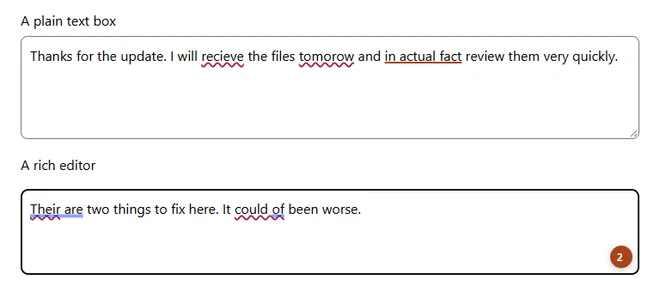
Type in any text box. Mistakes get a wavy underline, and a small orange badge shows how many there are. Click an underline, or press Alt+Shift+F, to see the suggestion. Click the Fairtake icon in the toolbar to pick your English or switch it off for a site.
Good to know
- Private: no account, nothing sent anywhere, and it never runs in password fields. The privacy policy has the details.
- Your browser may show a note about extensions in developer mode. That's normal for anything installed by hand.
- Updates aren't automatic yet. For a new version, download it again, unzip it over the old folder, then click the reload arrow on the Fairtake card in the extensions page.
- If you use Grammarly, Fairtake stays quiet in boxes Grammarly is checking. Turn one of them off for a site to use the other.
- Not supported yet: Google Docs, Firefox, Safari and phones. For those, use the free grammar checker on this site.
- To remove it, click Remove on the Fairtake card in the extensions page, then delete the folder.